I am running Joulescope on a Raspberry Pi Model 3B+ with 1GB of RAM. I am testing the ‘capture_simple.py’ example modified to capture for 10sec duration and sometimes I get this ‘invalid service type’ messages. What does it mean? Can I trust the output result? I want to use this script to test some hardware, just changing the capture time, but I want reliable measurements.
pi@tektester:~/joulescope/bin $ python3 capture_simple.py
invalid service type
invalid service type
invalid service type
invalid service type
0.10020232200622559 A, 3.7972707748413086 V
(joulescope) pi@tektester:~/joulescope/bin $
I think that you may be using an older version of pyjoulescope_driver. What do see when you run python -m pyjoulescope_driver info? Here is what I see on Windows:
PS C:\repos\Jetperch\pyjoulescope_examples\bin> python -m pyjoulescope_driver info

    SYSTEM INFORMATION
    ------------------
    python               3.14.3 (tags/v3.14.3:323c59a, Feb  3 2026, 16:04:56) [MSC v.1944 64 bit (AMD64)]
    python impl          CPython
    platform             Windows-11-10.0.26300-SP0
    processor            Intel64 Family 6 Model 183 Stepping 1, GenuineIntel
    CPU cores            24 physical, 32 total
    CPU frequency        3000 MHz (0 MHz min to 3000 MHz max)
    RAM                  45.8 GB available, 63.7 GB total (71.9%)

    PYTHON PACKAGE INFORMATION
    --------------------------
    jls                  0.18.0
    joulescope           1.6.0
    numpy                2.4.6
    pyjoulescope_driver  2.4.1


    JOULESCOPE INFORMATION
    ----------------------
    u/js320/31NB: hw=0.0.1, fw=1.1.8, fpga=1.1.8
Hi @mliberty the driver seems to be the latest but not sure about the fw.
pi@tektester:~/joulescope/bin $ python -m pyjoulescope_driver info
SYSTEM INFORMATION
------------------
python               3.13.5 (main, Aug 10 2026, 12:06:59) [GCC 14.2.0]
python impl          CPython
platform             Linux-6.18.50+rpt-rpi-v8-aarch64-with-glibc2.41
processor
CPU cores            4 physical, 4 total
CPU frequency        1400 MHz (600 MHz min to 1400 MHz max)
RAM                  0.7 GB available, 0.9 GB total (74.8%)

PYTHON PACKAGE INFORMATION
--------------------------
jls                  0.18.0
joulescope           1.6.0
numpy                2.5.3
pyjoulescope_driver  2.4.1


JOULESCOPE INFORMATION
----------------------
u/js320/0RH6: could not retrieve details
Do you have the JS320 open in something else, such as the UI? Note that you can only have a Joulescope open in one host application at a time. Close other programs, and try this command again.
I have been trying to duplicate this on a Raspberry Pi 5 Model B Rev 1.0 with no luck so far. I modified the capture_simple.py example so that device.read(contiguous_duration=10), but I do not see any invalid service type messages across multiple attempts.
Other than changing contiguous_duration, did you make any other edits to capture_simple.py?
The joulescope_driver emits the invalid service type message here. This can happen if bad data arrives over USB. The message is rejected, so everything else should still work. I wonder if this is some strange behavior of the Raspberry Pi Model 3B+?
I really doubt that this will change anything, but you can try forcing a firmware update:
The firmware updated made no difference. AI is saying it could be the power supply or USB issues. I removed other devices from the USB ports but I’m seeing the same error. I will get another power supply tomorrow just to be sure.
Can you confirm if the RAM on this Pi is sufficient to run the Joulescope?
Another possible issue is that the RP 3B+ is pretty slow compared to anything that we test on. It should still be able to stream data fast enough, but some latent communication timing issue could cause these warning messages.
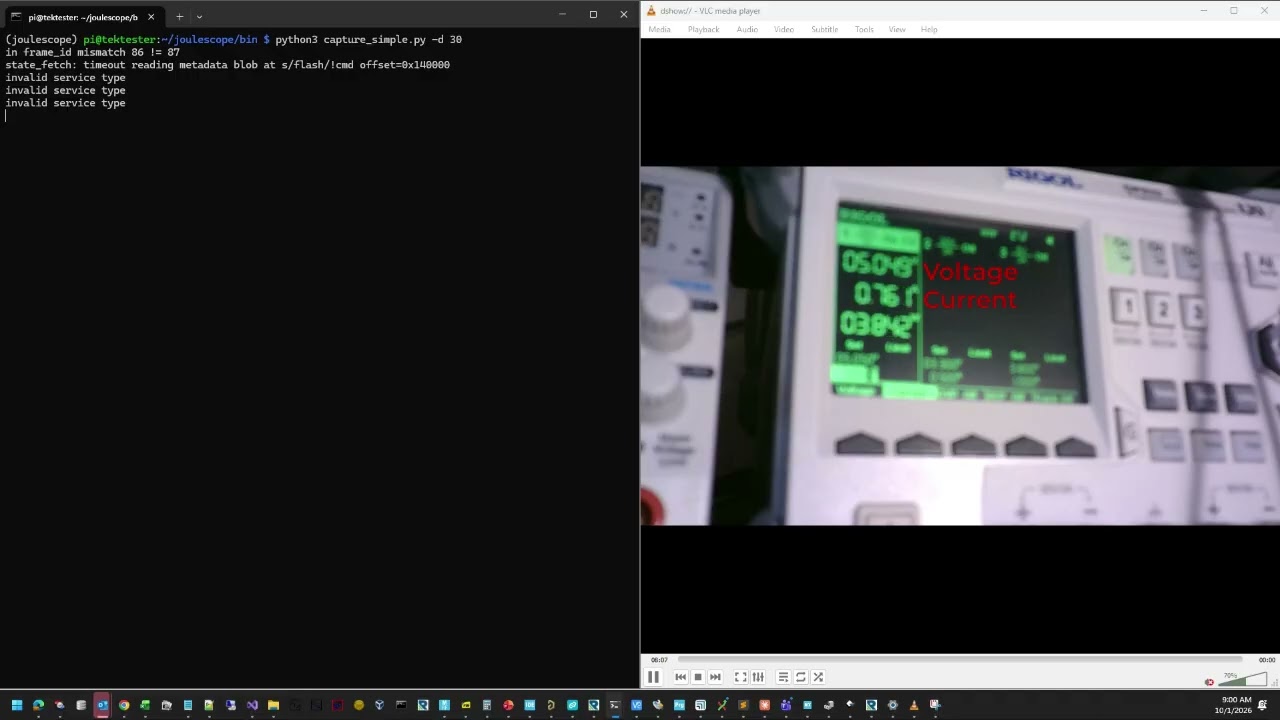
I tried with an external power supply set to 3A output and noticed that the message appears when current spikes occur - see the video below. I suspect this Pi model doesn’t supply enough current to the device. I have a RP 4 B used on another project, I will test with it.
Same thing with RP4 (4GB of RAM). Joulescope is connected to a USB3 port. Power supply is the official RP4 adapter.
pi@pi4tester:~/joulescope/bin $ python3 capture_simple.py invalid service type 8.778516757956822e-08 A, 0.5216395258903503 V (joulescope) pi@pi4tester:~/joulescope/bin $
SYSTEM INFORMATION
------------------
python               3.13.5 (main, Aug 10 2026, 12:06:59) [GCC 14.2.0]
python impl          CPython
platform             Linux-6.18.50+rpt-rpi-v8-aarch64-with-glibc2.41
processor
CPU cores            4 physical, 4 total
CPU frequency        1500 MHz (600 MHz min to 1500 MHz max)
RAM                  3.3 GB available, 3.7 GB total (89.1%)

PYTHON PACKAGE INFORMATION
--------------------------
jls                  0.18.0
joulescope           1.6.0
numpy                2.5.3
pyjoulescope_driver  2.4.1


JOULESCOPE INFORMATION
----------------------
u/js320/0RH6: hw=0.0.1, fw=1.1.8, fpga=1.1.8
Not sure if it makes any difference but the Joulescope is running on virtual environment. The PI operating system didn’t allow a system installation, like you advise in your documentation ( Installation — joulescope 1.6.0 documentation ).
I think the JS320 should work on RP 4 or 3. I have a Raspberry Pi 4 B that I can try. What OS distribution are you using?
The JS220 and JS110 are obsolete and no longer available. Our only official Linux support is for Ubuntu latest LTS. However, many people have been successful running Joulescopes under other distros & hardware, including Raspberry Pis. We only recently added Linux arm64 binaries to pypi.
I flashed a new SD card for an RP4B, and I am now able to reproduce the issue. It’s not consistent, but it happens enough that I should be able to investigate. Here are several runs of the modified, 10-second-long capture_simple.py:
(joulescope) ci@ci-linux-arm-2:~ $ python capture_simple.py
invalid service type
-1.0746504131020629e-08 A, 0.8014577031135559 V
(joulescope) ci@ci-linux-arm-2:~ $ python capture_simple.py
invalid service type
7.536211654723957e-10 A, 1.7854353189468384 V
(joulescope) ci@ci-linux-arm-2:~ $ python capture_simple.py
-7.972246862664178e-09 A, 2.800898790359497 V
(joulescope) ci@ci-linux-arm-2:~ $ python capture_simple.py
invalid service type
5.140266878811417e-09 A, 1.1420485973358154 V
(joulescope) ci@ci-linux-arm-2:~ $ python capture_simple.py
invalid service type
2.318586656002708e-09 A, 0.14491893351078033 V
(joulescope) ci@ci-linux-arm-2:~ $ python capture_simple.py
4.04953315324974e-09 A, 0.15387819707393646 V
(joulescope) ci@ci-linux-arm-2:~ $ python capture_simple.py
5.0928434802699485e-09 A, 0.2985912561416626 V
Thanks for reporting this, and for the details that let us reproduce it.
We found the cause. It’s a firmware bug in the JS320 that was introduced in firmware 1.1.8. When the JS320 is connected but not streaming, it periodically checks its internal communication link. The JS320 answers that check with a malformed reply, and the host software reports it as “invalid service type.”
The warning is harmless, and you can safely ignore this warning. The malformed reply isn’t measurement data, and the host software discards it.
You see it on the Raspberry Pi and not on other computers mainly because of speed. The check only runs after a short idle period, and the Pi takes long enough between opening the JS320 and starting the capture to trigger it.
We have a fix and have confirmed it on our test hardware. It will be included in the next JS320 firmware release. Until then, no action is needed
We just released JS320 firmware 1.1.9 which fixes this issue. We will not be pushing out this change until our next UI release, but you can manually update. Here is how:
wget https://download.joulescope.com/firmware/js320/js320-1_1_9.zip
python -m pyjoulescope_driver program --package js320-1_1_9.zip
I did encounter this on a Windows system, and updating the FW to 1.1.9 resolved it.
Here’s the system info before updating case it helps. The Joulescope is (unavoidably) on a USB hub which might be a factor in seeing the issue.
SYSTEM INFORMATION

    ------------------

    python               3.14.2 (tags/v3.14.2:df79316, Dec  5 2025, 17:18:21) [MSC v.1944 64 bit (AMD64)]

    python impl          CPython

    platform             Windows-10-10.0.19045-SP0

    processor            Intel64 Family 6 Model 85 Stepping 4, GenuineIntel

    CPU cores            10 physical, 20 total

    CPU frequency        3312 MHz (0 MHz min to 3312 MHz max)

    RAM                  322.5 GB available, 383.7 GB total (84.0%)


    PYTHON PACKAGE INFORMATION

    --------------------------

    jls                  0.18.0

    joulescope           1.6.0

    numpy                2.2.6

    pyjoulescope_driver  2.4.1


    JOULESCOPE INFORMATION

    ----------------------

    u/js320/D794: hw=0.0.1, fw=1.1.8, fpga=1.1.8