Joulescope stuck on Blue LED: Joulescope updater stuck, manual firmware flash works, except sensor FPGA update is blocked

Joulescope JS220 Recovery Request — Sensor FPGA Bricked During Update

Device Information

  • Model: JS220

  • Serial Number: 003415

  • Hardware Revision: 1

  • Original Firmware: FW 1.2.1 / FPGA 1.2.1

  • Target Update: FW 1.3.0 / FPGA 1.3.3

  • Joulescope UI Version: 1.4.1

  • Platform: macOS 26.4, Apple M1 Max (arm64)

Symptom

Solid blue LED. Device is detected on USB as “Joulescope JS220” (Jetperch LLC, serial 003415) but OP_CONNECT always times out. The Joulescope UI shows “driver open failed” on every launch.

What Happened

On 2026-04-07, a firmware update from FW 1.2.1/FPGA 1.2.1 → FW 1.3.0/FPGA 1.3.3 was initiated via the Joulescope UI (v1.4.1).

The update progressed through the updater state machine normally:

  1. Updater1/updater2 version checks completed

  2. Updater1 and updater2 were programmed successfully

  3. Sensor FPGA (s/app1) erase completed successfully (mem_complete(0))

  4. Sensor FPGA write started — approximately 50KB of 342KB was transferred via bulk OUT

  5. USB pipe errorlibusb_submit_transfer returned -9 (LIBUSB_ERROR_PIPE)

  6. Write timed out after 10 seconds

  7. All subsequent erase retries returned ABORTED (error code 24)

  8. The Joulescope UI was restarted (the progress bar was stuck at 0%)

After the restart, the device could never reconnect — OP_CONNECT times out on every attempt.

Recovery Attempts

CLI Recovery (pyjoulescope_driver 1.5.8)

Using raw mode (Driver.open(path, mode='raw')), we were able to:

  • :white_check_mark: Open the device successfully

  • :white_check_mark: Erase and write h/mem/c/app (controller app v1.3.0)

  • :white_check_mark: Erase and write h/mem/c/upd1 (updater1 v1.2.1)

  • :white_check_mark: Erase and write h/mem/c/upd2 (updater2 v1.2.1)

  • :white_check_mark: Reset to app mode — device re-enumerates as u/js220/003415

  • :cross_mark: Cannot erase or write h/mem/s/app1 — returns PERMISSIONS error from both updater1 and updater2 in raw mode

Root Cause Analysis

The sensor FPGA region (s/app1) requires a completed OP_CONNECT handshake to unlock memory write permissions. However, OP_CONNECT requires the FPGA to be functional to send the bulk IN connect response. Since the FPGA is erased/corrupt, this creates a deadlock:

  • OP_CONNECT → needs FPGA running → FPGA is blank

  • Write FPGA → needs OP_CONNECT → can’t connect

Raw mode bypasses the OP_CONNECT wait on the host side, but the device firmware still enforces the permission check.

Joulescope UI Attempt

After restoring the controller firmware, we launched the Joulescope UI (v1.4.1). Same result: OP_CONNECT timed out, driver open failed. The UI never reaches the device update dialog.

Current Device State

  • Controller app: v1.3.0 (freshly written, boots to app mode)

  • Updater1: v1.2.1 (freshly written)

  • Updater2: v1.2.1 (freshly written)

  • Sensor FPGA (s/app1): ERASED / PARTIALLY CORRUPT (original erase succeeded, write failed ~15% through)

  • USB enumeration: Device appears as “Joulescope JS220” with serial “003415”, idVendor=0x16D0, idProduct=0x10BA

Log Files

All log files are available at:

~/Library/Application Support/joulescope/log/

Key log files:

  • joulescope_20260407_235207_62612.log — Contains the original failed FPGA write attempt

  • joulescope_20260407_234828_39715.log — Contains the initial update initiation

  • joulescope_20260408_013056_15766.log — Latest UI attempt after CLI recovery of controller firmware

Request

Is there a way to recover this device? Possible approaches:

  1. A firmware build or special tool that allows FPGA writes without requiring OP_CONNECT

  2. JTAG/SWD recovery procedure

  3. RMA/repair

Thank you for your help!

it looks like “New users are not able to upload attachments”, so I can’t upload my logs.zip, but would be happy to email this to support@jetperch.com

This markdown file was generated by a claude/opus4.6 debug session in trying to read the joulescope logs, which figured out that the firmware had been erased but not written to, and figure out how to get the device back to normal. We got stuck using python-joulescope to try to flash the firmware manually, since the Joulescope UI wasn’t giving us that option.

Instead of sharing the logs.zip, this is the timeline pieced together when goose/claude-opus4.6 read through my joulescope logs:

Let me start by reading the log file to understand what’s happening with your Joulescope.


Now let me check if there are any more recent log files that might have additional information:


Great news — your Joulescope is almost certainly NOT bricked. Here’s what I found from analyzing all 9 log files:


:clipboard: What Happened

Here’s the timeline I reconstructed from the logs:

  1. 16:41 — Your JS220 (serial #003415) was working normally on FW 1.2.1 / FPGA 1.2.1. The app detected an available update to FW 1.3.0 / FPGA 1.3.3.
  2. 16:49:43 — You initiated the firmware update. The device reset into updater mode, but immediately hit USB communication errors (libusb_set_configuration failed: -4). The updater couldn’t open the device cleanly.
  3. 16:52–16:53 — The updater eventually connected and began writing firmware to the app1 region, but the write timed out. It then tried to erase app1 to retry, but the erase also failed — 10 consecutive retries, all ABORTED. This is when the progress bar was stuck at 0%.
  4. ~16:53 — You restarted the Joulescope app (understandably!). But the damage was done: the app1 firmware region had been partially erased/corrupted and never successfully rewritten.
  5. All sessions after that — The device is detected as JS220-003415 but every connection attempt fails with OP_CONNECT timed out and driver open failed. The version info returns None.

:light_bulb: What This Means

The solid blue LED means your device is running its bootloader/updater — it’s alive and communicating over USB, it just doesn’t have valid application firmware to boot into. This is a recoverable state.

and this is where it got stuck:

OK, here’s where we are. Let me take stock and give you a clear picture.


:bar_chart: Recovery Status

Here’s what we’ve accomplished and where we’re stuck:

Region Status Notes
c/app (Controller App) :white_check_mark: v1.3.0 written Device boots to app mode
c/upd1 (Updater 1) :white_check_mark: v1.2.1 written Working
c/upd2 (Updater 2) :white_check_mark: v1.2.1 written Working
s/app1 (Sensor FPGA) :cross_mark: BLOCKED PERMISSIONS error from both updaters

The Problem

The sensor FPGA (s/app1) is the corrupted region from the original failed update. We can’t write to it because:

  1. Raw mode lets us open the device and write controller firmware, but the device’s own firmware rejects FPGA writes with a PERMISSIONS error — it appears the OP_CONNECT handshake must complete first to “unlock” FPGA memory operations.
  2. Normal/restore mode can’t complete the OP_CONNECT handshake because OP_CONNECT requires the FPGA to be functional to send the bulk IN response.

This is a chicken-and-egg deadlock: need FPGA to connect → need connection to write FPGA.

Hi @tlmmyturner - Unfortunately, this is a known, but very infrequent, issue. The JS220 relies on the multi-image boot feature of the Lattice ECP5. Unfortunately, as you have observed, this multi-image boot feature does not always fall-back correctly. Our theory is that it only evaluates the first frame in the FPGA bitstream before declaring the image good. If a subsequent frame is bad, it happily continues with what ends up being a non-functional image, which renders the JS220 non-operational.

If you have an FTDI adapter like Tigard, you can recover without too much pain. See below. If this is too much, we are also happy to replace your JS220. Please contact support@joulescope.com with your shipping info (name, address, email, phone number) and provide a link to this post.

For what it’s worth, the third-generation JS320 will solve this issue.


Joulescope JS220 FPGA Programming

Manually program primary gateware image
2025-05-20

I used Tigard GitHub with eccprog on Ubuntu 24.04 LTS.

Configure udev rules

While you can use any FTDI adapter, here are the rules for Tigard. You may need to adjust for your specific FTDI adapter.

cat <<EOF > 99-ftdi.rules
ACTION=="add", SUBSYSTEM=="usb", ATTR{idVendor}=="0403",GROUP="plugdev", MODE="0666"
EOF
sudo cp 99-ftdi.rules /etc/udev/rules.d/
sudo udevadm control --reload-rules

Prepare ecpprog

git clone https://github.com/gregdavill/ecpprog.git
sudo apt-get install libftdi-dev
cd ecpprog/ecpprog
make

Wire Tigard or FTDI board to JS220

Note that Tigard’s JTAG is on port B, so we will need to provide the “-I B” option to ecpprog.

Program JS220’s FPGA SPI Flash with image

Verify connection:

./ecpprog -I B -t

Should see:

init..
IDCODE: 0x41111043 (LFE5U-25)
ECP5 Status Register: 0x00100180
flash ID: 0xC8 0x40 0x16
Bye.

And program:

./ecpprog -I B ~/js220_fpga_1_3_3.bin -A

Should see:

init..
IDCODE: 0x41111043 (LFE5U-25)
ECP5 Status Register: 0x00100080
reset..
flash ID: 0xC8 0x40 0x16
file size: 524288
erase 64kB sector at 0x000000..
erase 64kB sector at 0x010000..
erase 64kB sector at 0x020000..
erase 64kB sector at 0x030000..
erase 64kB sector at 0x040000..
erase 64kB sector at 0x050000..
erase 64kB sector at 0x060000..
erase 64kB sector at 0x070000..
programming..  524288/524288
verify..       524288/524288  VERIFY OK
rebooting ECP5...
Bye.

Verify

  1. Disconnect Tigard
  2. Start Joulescope UI

js220_fpga_program_1_3_3.zip (305.9 KB)

Hi Matt,

Thank you for the detailed recovery instructions — and for confirming this is a known (if rare) ECP5 multi-image boot issue. That matches exactly what we diagnosed from the logs: the erase succeeded, the write got ~50KB in before a USB pipe error, and the FPGA accepted the partial image as “good” and won’t fall back.

I’d like to attempt the JTAG recovery before taking you up on the replacement offer. I have an FTDI cable on hand, but it’s not a Tigard — I want to confirm compatibility and get a couple of clarifications before I connect anything.


My FTDI Adapter

I have a C232HM-EDHSL-0 cable (product page, datasheet).

This is a single-channel FT232H-based MPSSE cable with the following pinout:

| Pin | Wire Color | Signal (JTAG mode) | Type |

|-----|-----------|-------------------|------|

| 1 | Red | VCC | Power Output |

| 2 | Orange | TCK | Output |

| 3 | Yellow | TDI | Output |

| 4 | Green | TDO | Input |

| 5 | Brown | TMS | Output |

| 6 | Gray | GPIOL0 | I/O |

| 7 | Purple | GPIOL1 | I/O |

| 8 | White | GPIOL2 | I/O |

| 9 | Blue | GPIOL3 | I/O |

| 10 | Black | GND | Ground |

Voltage Considerations

The I/O signals (TCK, TDI, TDO, TMS) are all 3.3V LVCMOS (Voh = 3.14V typical), which I believe is compatible with the ECP5 JTAG interface.

However, the -EDHSL variant outputs 5.0V on the VCC pin (Red wire) — it passes USB VBUS directly. (The other variant, -DDHSL, outputs 3.3V from an onboard regulator.)

My plan is to leave the Red (VCC) wire disconnected entirely, and power the JS220 through its own USB cable during programming. Can you confirm this is the correct approach? I want to make sure I’m not missing a case where the FPGA JTAG interface needs external power from the programmer.

Command Differences

Since the C232HM is a single-channel FT232H (vs. Tigard’s dual-channel FT2232H with JTAG on port B), I believe the ecpprog commands would change from -I B to -I A (or omit the flag since A is the default):

Verify connection:


./ecpprog -I A -t

Program:


./ecpprog -I A ~/js220_fpga_1_3_3.bin -A

Can you confirm this is correct?


JTAG Pin Location on the JS220

This is my main question before proceeding: where are the JTAG pins physically located on the JS220?

Specifically:

  • Are the JTAG signals accessible through the externally-facing GPIO/auxiliary pins on the JS220 enclosure (without opening it)?

  • Or do I need to open the JS220 enclosure and connect to JTAG pads/header on the PCB itself?

If it’s the latter, a photo or diagram showing the JTAG pad locations and pinout on the PCB would be very helpful. Or even confirming which pins on my FTDI cable go to which pins on the Joulescope GPIO headers.

I won’t connect anything until I understand the full physical setup. Thanks again for your help!

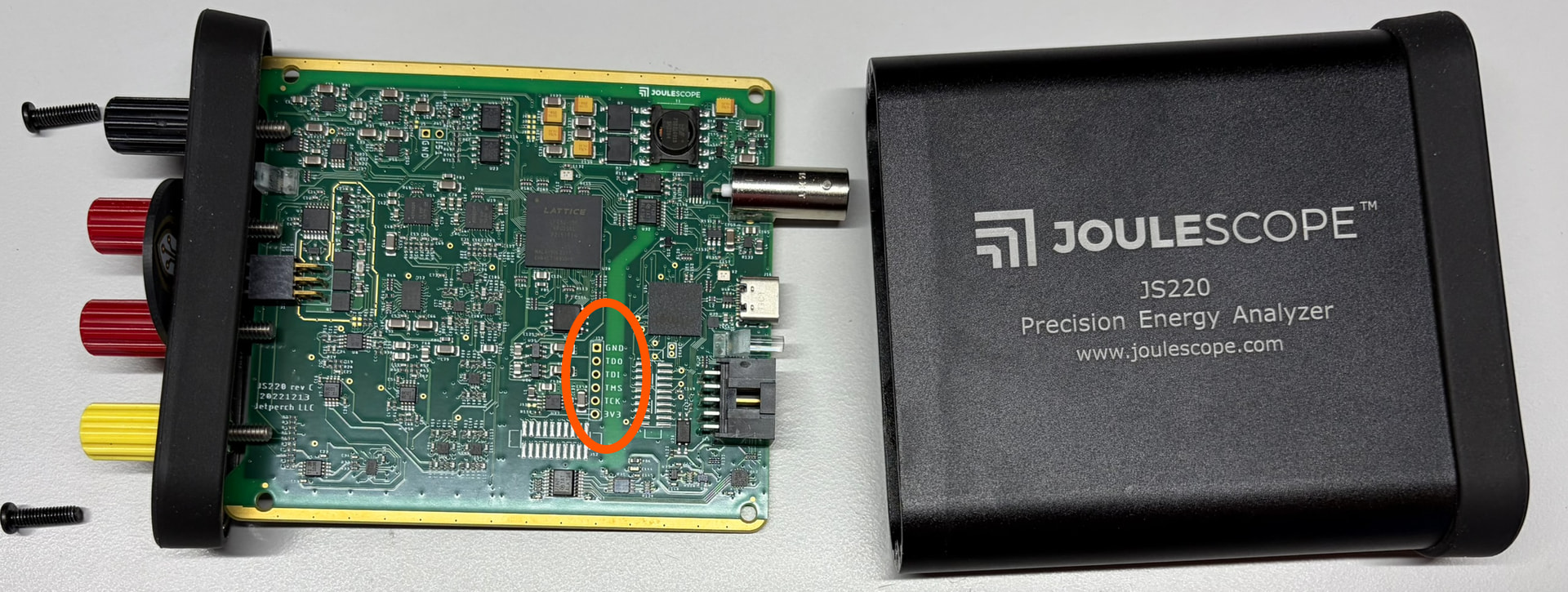
Hi @tlmmyturner - Great! Yes, you will have to open the JS220. The JTAG signals are 3.3V and clearly marked:

You should only need to connect TCK, TDI, TDO, TMS and GND. Do not connect VCC. You will need to connect USB from your JS220 to the host computer and have it power the sensor side. The easiest way is to simply start the Joulescope UI. You should see the sensor-side LED illuminated slightly white when the FPGA is unprogrammed.

For one-off programming, I tend to use breadboard jumper wires like these and simply hold them in place. Alternatively, you can use a 2-sided header to connect the f cables from your adapter, or you can solder in a header.

Your commands look correct.

Worst case is that you destroy the JS220 in this process and we ship you a new one, so no fear! :slight_smile: