Hi,
I am facing an issue with the JS220 while trying to monitor power variation during pointer operations in my code.
To track this, I added GPIO triggers around specific code segments and connected the corresponding GPIO pin to IN2. While these triggers work as expected in most places—showing correct measurements in the JS220 oscilloscope view—I am encountering a problem in specific areas of the code.
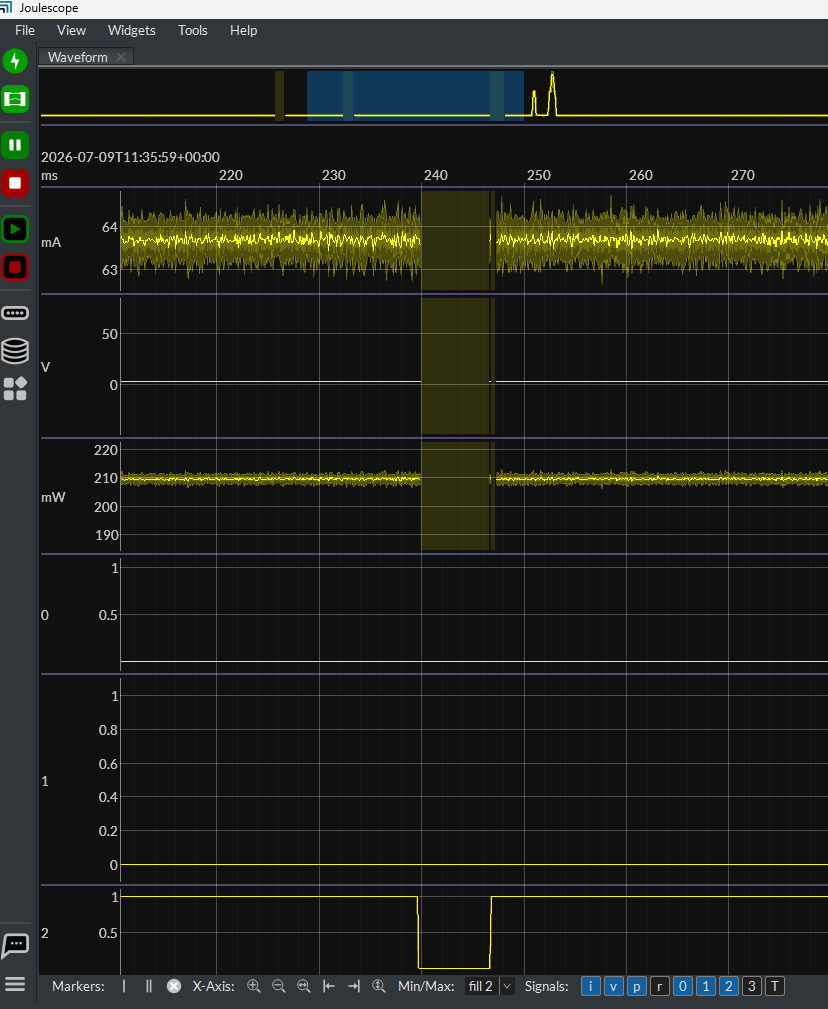
Sometimes, the JS220 fails to detect the trigger entirely. When it does detect it, the voltage, power, and current waveforms completely vanish during the trigger period and only reappear after the trigger ends. The trigger pulse width when this issue occurs is in the nanosecond range.
Could such a narrow nanosecond trigger cause this behavior in the JS220?
If I introduce a delay between the trigger edges (widening the pulse), the power and current variations display as expected. I have attached a photograph showing that when IN2 goes low, the corresponding power, current, and voltage data disappears. We initially suspected a microcontroller malfunction, but we have verified that it is working exactly as expected.
Best regards,
Ranjith Remasan
Hi @Ranjith - In the screen capture above, that vertical area represents lost samples. With the floating-point signals current, voltage, and power, the UI can represent lost samples, which is why you see the indication there. Digital signals cannot represent a third state, so they will always be zero during lost samples.
Now, the question is why this happens. I suspect that you have another device on the same USB root hub that is greedy. USB devices share time on the bus. If one device has lots of traffic, it can starve other devices. Low-speed and full-speed devices can be particularly problematic as they take more USB time for much less data.
Is there other USB activity that happens in your system at these same times?
Possible solutions include:
- Removing or disabling the other USB devices causing traffic
- Purchasing a PCIe to USB card for your desktop computer, which adds an independent USB root hub.
- Using on-instrument downsampling to reduce the JS220 data rate.
Does this help isolate the issue?
HI @mliberty
I have only the JS220 connected to my laptop’s USB Type-C port, with no other devices sharing the bus.
My observation is that while most of the triggers added across different areas of the code have a pulse width in the millisecond (ms) range, this particular case results in a nanosecond-wide pulse. If I disable the trigger in this specific section, no data missing (power, current, voltage) occurs.
There are two other trigger lines enabled simultaneously, but they do not cause any data loss.
Do you have USB devices connected to any other USB ports? Note that USB ports on a computer normally share the same root hub.
A nano-second wide pulse should not cause any issues with the Joulescope. It will most likely not even see it as it only samples the digital values at 2 Msps. The inputs also have filtering, so fast edges should not matter at all, either.
Note that you can use USBView to display the full USB bus topology. You have to download it as part of the Windows SDK. Details here: